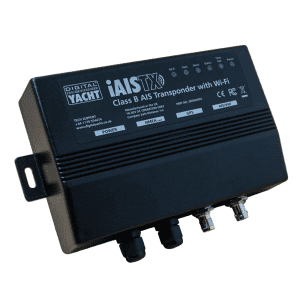
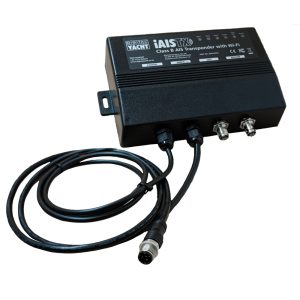
Home » Shop » AIS Systems » AIS Transponders » iAISTX Plus – AIS Transponder with WiFi & NMEA 2000

iAISTX Plus – AIS Transponder with WiFi & NMEA 2000

1020,00

“iAISTX Plus is an AIS transponder with Wi-Fi interface for tablet & PC navigation and also has a NMEA 2000 interface (with integral drop cable) to integrate with modern plotters, instruments and multi-function displays to provide AIS functionality.”

SKU: ZDIGIAISTXPL Categories: , Tags: ,
Description

KEY FEATURES

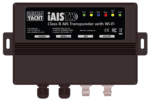
There are a growing number of boaters that use an iPad or Android tablet for their navigation tasks and thus the iAISTX Plus was designed specifically for their needs. This full function Class B+ AIS transponder with WiFi and NMEA 2000, is able to send your boat position and identity data to other AIS equipped vessels. It also provides a wireless interface for mobile devices. This allows popular apps to display received data from other AIS equipped vessels.

Our latest Class B+ transponders now feature SPAIS technology – enabling satellite reception of AIS transmissions. SPAIS is Digital Yacht’s proprietary technology that optimises messaging for long-range satellite tracking. Easily activated from the setup menu, it prioritises your AIS signals for satellite reception — ideal for offshore and ocean sailors who want reliable shore based tracking beyond 20NM from the coast.

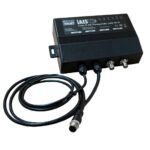
This PLUS model with an NMEA 2000 interface (with integral drop cable) can integrate with modern plotters, instruments and multi-function displays to therefore provide AIS functionality.

iAISTX Plus creates a secure, password protected, local Wi-Fi network which allows AIS and GPS data to be sent to popular iOS and Android apps such as Navionics, iSailor, Weather4D, SailGrib, iNavX, TimeZero and more. These apps offer a detailed overlay of local AIS targets all updated in real-time. Depending upon the app, you can click on a target and can see identity as well as collision avoidance data such as CPA (closest point of approach) and TCPA (time to closest point of approach).

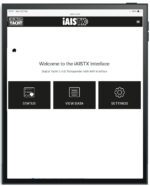
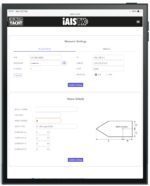
The tablet’s browser (Safari, Chrome, etc.) provides a simple, embedded web interface for one time programming of the boat’s identity and physical dimensions, required of all AIS transponders. Silencing the transmission and setting up wireless parameters such as passwords can also be done via this web interface.  Installation is simple – just connect power (12/24v), mount the supplied external GPS antenna and connect to a separate dedicated VHF antenna or to the boat’s existing VHF antenna using our SPL1500 or SPL2000 AIS-VHF antenna splitters.

CONFIGURATION

In order to facilitate the use and configuration of our AIS transponders, our iAISTX has a built-in web interface. The configuration of the transponder can be done through a computer, a tablet or even a smartphone and most importantly, no software is require

You can configure the iAISTX through its own simple web interface, just open your web browser, enter the iAISTX’s IP address and you can configure the vessel details (MMSI number, Boat name, etc.), network name, password and even merge the AIS’s WiFi to an existing WiFi network on board.  So no complicated programming software or app required.

You can even view the received NMEA data in the web browser, for easy fault finding of issues. Finally, the iAISTX supports TCP and UDP network protocols for maximum compatibility with apps.

SPECIFICATIONS

  • Class B+ 5W AIS transponder with WiFi and NMEA 2000
  • SPAIS enabled with additional messaging for satellite reception of AIS transmissions
  • WiFi interface for phones, tablets, iPads and PCs
  • NMEA 2000 interface for plotter and multi function display AIS compatability
  • Support for all the latest target types such as ATONs and AIS MOB devices
  • Latest HF AIS technology for superior performance
  • UDP and TCP/IP protocols supported for up to 7 connected devices
  • Password protected, secure wireless connection
  • Internal wifi antenna will typically footprint a boat up to 60ft in length
  • Supplied with external GPS antenna and 10m cable which can be deck mounted or fitted to standard 1” mount
  • Compatible with 100s apps.  See our reviews at www.digitalyacht.net
  • LED status indicators for wireless connection, data, status, time out, power and silent mode
  • Easy embedded web interface for programming
  • Measures just 20 x 14 x 4.5cm
  • 12/24V operation and ultra-low 2W consumption
Additional information
Weight 1250 g
Dimensions 330 × 230 × 100 mm
Sales FAQs

I have already a Wi-Fi router on board - can I join the product Wi-Fi to an existing network?

Yes! You can program this through the web interface so you just have one Wi-Fi network on board with our product linked directly to your other Wi-Fi network as a client.

This works well as well with Furuno WiFi radar installations.

What is the wireless interface range?

The Wi-Fi will typically footprint a boat up to 25m LOA. Contact us if you need a bigger footprint or have a steel or carbon vessel.

What is the AIS transponder Wi-Fi network password?

Our AIS transponders with a built-in web interface create a password protected WiFi network. With your tablet, PC or smartphone, if you scan for wireless networks, you should see a wireless network called “AIT6000-xxxx” or “IAISTX-XXXX” where xxxx is a four-digit code unique to your AIS transponder. The name of the WiFi networks might change according to the product version.

Make your device join this network and you will be asked to enter a password which is “PASS-xxxx” where xxxx is the same four-digit code as in your network name. You can change both the network name and password in the AIS transponder unit’s web interface.

For example, if your AIS transponder WiFi network is called: iAISTX-D6F8 therefore the password is: PASS-D6F8

Where can I find compatible apps?

We keep up to date reviews on our news blog at www.digitalyacht.net – search for Best Marine Apps for Android or iOS. Popular apps include Boating Navionics, iNavX, TZ iBoat, Navimetrix, OpenCPN, iAIS, NavLink, iSailor, SeaPilot, Adrena, Weather 4D, MaxSea TimeZero, SailGrib and literally 100s more.

Any navigation app or software that is NMEA-compatible can receive data from our products.

Our products are also fully compatible with navigation software running on PC, Mac, and Linux platforms.

Does the iAISTX Wi-Fi network transmit NMEA 2000 data?

No, the WiFi network only transmits AIS and GPS data. The NMEA 2000 interface is only to output AIS and GPS data to the NMEA 2000 network.

With AIT6000, NMEA 2000 data are also being transmitted over WiFi.


Do I need an internet connection?

No internet connection is required. Many consumers get confused and automatically associate wifi with internet. The product creates a wifi network and the local iPad or tablet users searches for this in the same way they search for a wifi hotspot.

Once connected, NMEA data is sent over the local link created on board the boat.

How to check if my AIS is transmitting?

This is a very valid question. After spending several hours installing a transponder, it is understandably important to confirm that it is operating correctly. The proAIS2 configuration software allows you to verify that the GPS position is valid, monitor the reception of AIS signals from other vessels, and confirm that there are no errors or alarms. However, for those new to AIS, there is often a lingering uncertainty about whether your own vessel is being seen by others.

The most reliable way to test a Class B+ AIS transponder is to ask another vessel in your marina that is equipped with AIS to confirm that they are receiving your transmissions. When your vessel is stationary, the transponder transmits approximately every three minutes. Once your speed over ground (SOG) exceeds 2 knots, the transmission rate increases to every 30 seconds. For this reason, it is important to allow sufficient time for your signal to be detected. Additionally, upon initial reception, other vessels will see only your dynamic data—position, speed, course, and MMSI number. It may take up to six minutes for your static data (vessel name, call sign, vessel type, dimensions, etc.) to be received. This behavior is normal and reflects how the AIS system manages data transmission bandwidth.

Another increasingly common method of verifying AIS operation is to check one of the online “live” AIS tracking websites. Among the free services available, MarineTraffic.com is one of the most widely used.

It is important, however, to understand the limitations of these online platforms and not to assume that your vessel will always be visible on them. The accuracy and availability of these services depend entirely on their network of AIS receiving stations, which are often operated by volunteers and enthusiasts. Coverage can be excellent in some areas, but gaps in reception do exist.

How to configure a navigation app or software?

On our blog, we maintain a list that explains how to configure all the most popular navigation apps and software. The guide covers both how to set up an NMEA connection (UDP/TCP) and how to configure the AIS settings within each app or software package.

To see the list, please click here:  https://digitalyacht.support/tutorials/how-to-configure-apps-software/ 

How to configure the AIS transponder?

In order to facilitate the use and configuration of our AIS transponders, our new AIS transponders now have a built-in web interface. This is the case for the iAISTX, iAISTX Plus and AIT5000. These devices create a WiFi network on board and configure themselves by connecting to WiFi. The configuration of the transponder can therefore be done through a computer, a tablet or even a smartphone and most importantly, no software is required.

The following video explains you step by step how to configure a Digital Yacht AIS transponder via its web interface:

What is the difference between an AIS Receiver and a Transponder?

An AIS which sends and receives data is known as a transceiver (or often called a transponder). There are also simple devices called AIS receivers which pick up transmissions and decode for displaying on a compatible chart plotter or PC based navigation system – or even an iPad or tablet.

AIS transponders will allow you to receive data from vessels close to you, but will also allow you to continuously transmit your vessel’s identity, position, speed and heading, as well as other relevant information, to all other AIS-equipped vessels within your range.

To transmit its position, an AIS transponder must have its own GPS antenna. All our AIS transponders are supplied with a GPS antenna or have a built-in GPS antenna.

What is the difference between AIS Class B, Class B+ 5w and Class A?

There are 3 types of AIS transponders: Class A, Class B and Class B+ :

  • Class B AIS Transponder is for recreational craft installation and is a simplified, lower powered 2W transceiver which is normally a black box and uses a connected chart plotter to display local AIS targets. It transmits every 30 seconds regardless of vessel speed and can’t transmit additional data like destination port.
  • Class B+ AIS Transponder (also called Class B SOTDMA or Class B 5W ) is a new standard that utilises SOTDMA format transmissions which offer a 5W power output (2.5 x more powerful than a regular Class B), a guaranteed time slot for transmission in busy traffic areas and faster update rates depending upon the speed of the vessel. It’s ideal for ocean sailors requiring the best possible performance and future proof satellite tracking applications, fast power boats and smaller non-mandated commercial vessels.
  • Class A AIS Transponder must have a dedicated (and type approved) display to show the location of nearby AIS targets and transmits at 12.5W. Data is sent at up to every 2 seconds depending upon the vessel speed and the display also allows for data to be inputted to the transmission such as vessel destination. A Class A device is normally used on commercial vessels as its Type Approved to IMO specifications.
Should I use a dedicated VHF antenna or a VHF splitter?

If the AIS transponder doesn’t have a built-in VHF splitter (i.e. AIT5000), there are 2 options: either install a dedicated VHF antenna for AIS or install an antenna splitter so that the main VHF antenna is used for both VHF radio and AIS.

For those who want to use their existing VHF antenna, then we recommend the use of a certified zero loss VHF antenna splitter such as our SPL1500 and SPL2000. Please do not use a non-zero loss certified VHF antenna splitter. They are inexpensive, but they can destroy your AIS transponder.

For those who want to install a VHF antenna dedicated to AIS, then we recommend a VHF antenna tuned to AIS frequencies. The AIS transmission and reception works on 2 dedicated channels which use the frequencies 161.975 and 162.025 MHz (channel 87B and 88B). VHF frequencies in the maritime environment use frequencies from 156.0 to 162.025 MHz and most VHF antennas are designed to provide maximum gain on channel 16 (156.8 MHz). You can now find antennas on the market dedicated to AIS frequencies such as the HA156 antenna.

These antennas, dedicated to AIS frequencies, offer maximum gain at 162 MHz (which is the centre between the 2 AIS frequencies 161.975 and 162.025 MHz). So if you install a VHF antenna instead of a VHF antenna splitter for your AIS receiver or transponder, then choose an AIS frequency VHF antenna to compensate for the loss due to the installation of the antenna lower down than the main VHF antenna at the top of the mast. The graph below shows how a dedicated AIS frequency antenna (162 MHz) provides a better VSWR and therefore a better transmission and reception.

Which AIS transponder to choose?

To help you choose the AIS transponder that best suits your needs, the following guidelines may be useful:

  • Receive AIS targets on a chartplotter
    If you only want to receive AIS targets on a chartplotter, you can choose between the AIT2500, AIT6000, or iAISTX Plus. These units feature NMEA interfaces for connection to a chartplotter. If you have an older chartplotter, ensure that it is AIS-compatible. In that case, you will need either the AIT2500 or the AIT6000, as these are the only AIS transponders that support the legacy NMEA 0183 interface.


  • Receive AIS targets on software or mobile applications
    If you wish to receive AIS targets exclusively on navigation software or mobile applications, we recommend the iAISTX. This AIS transponder is equipped with an external GPS antenna and a built-in Wi-Fi server, allowing it to transmit AIS and GPS data wirelessly to tablets and smartphones.


  • Receive AIS targets on both a chartplotter and software/applications
    To receive AIS targets simultaneously on a chartplotter and navigation software or mobile applications, we recommend the AIT6000 (Class B+). The AIT6000 is our most comprehensive AIS transponder, featuring a certified zero-loss VHF antenna splitter, an NMEA multiplexer, an external GPS antenna, and an integrated Wi-Fi server.


  • AIS for rental boats
    If you are looking for a portable AIS receiver or transponder that can be easily transported and used on rental boats, the Nomad2 is the ideal solution. It is the only portable AIS transponder with a built-in GPS, USB power supply, and a portable VHF antenna.


Manual and Downloads

Smartertack Demo Features

4.1mb

PC Navigator Easy to use PC based navigation Software with Navionic’s compatability. Optimised for AIS target tracking and viewing

iAISTX Product Manual V2.02

1.01 MB

Product Manual for latest iAISTX (produced from Q3/2021) with combined AP+STA mode.

what inside box

  • 0.75M power cable
  • GPS antenna and 10m cable
  • NMEA2000 drop cable
  • Videos

    How to configure an AIS tranponder with web interface